
Heatmaps
Discover where players spend the most time across multiple gameplay sessions.
Heatmaps
While Session Replay helps you understand a single player's journey, Heatmaps reveal how all players interact with your level over time.
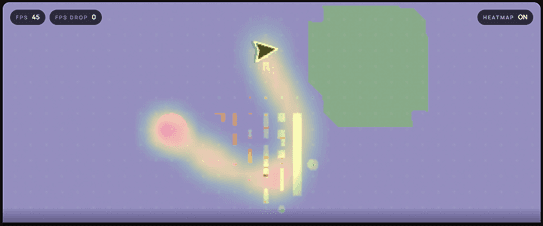
TrackEdge combines movement data from multiple Session Replays into a single visualization, making it easy to identify popular routes, exploration patterns, and areas where players spend the most time.
How Heatmaps Work
Every completed Session Replay contributes movement data to the Heatmap.
As more players play your game, the Heatmap becomes more accurate and better represents overall player behavior.
Unlike Session Replay, which shows one player's path, Heatmaps visualize the average movement of your player base.
When Does a Heatmap Become Available?
Heatmaps are generated after enough replay data has been collected.
As a general recommendation, you should have at least 50–100 completed Session Replays before expecting meaningful results.
Heatmaps are designed to represent player trends. With only a few sessions, the visualization may not accurately reflect real player behavior.
What Can You Learn?
Heatmaps help answer questions such as:
- Which paths do players take most often?
- Which areas are rarely visited?
- Where do players spend the most time?
- Which routes are ignored?
- Are players reaching important objectives?
- Are there unexpected exploration patterns?
These insights can help improve level design, player guidance, and overall gameplay flow.
Reading the Heatmap
The Heatmap uses color intensity to represent player activity.
| Color | Meaning |
|---|---|
| Cool Colors | Low player activity |
| Warm Colors | Moderate player activity |
| Bright Hot Colors | High player activity |
Areas with brighter colors indicate locations where players spend more time or frequently travel.
Best Practices
For the most accurate Heatmaps:
- Capture every playable map before releasing your game.
- Enable Session Replay for the levels you want to analyze.
- Collect data from real players instead of relying only on internal testing.
- Wait until at least 50–100 completed Session Replays have been recorded.
Heatmaps vs Session Replay
| Session Replay | Heatmap |
|---|---|
| Shows one player's gameplay | Shows all players combined |
| Useful for debugging | Useful for level design |
| Includes playback controls | Displays overall player activity |
| Records a single session | Builds over many sessions |
Next
You now understand how entire player base.
➡️ Map Capture