
Blueprint Nodes
TrackEdge is fully Blueprint compatible. No C++ knowledge is required.
Blueprint Nodes
TrackEdge is designed to work directly with Blueprints.
Every analytics feature is exposed as an asynchronous Blueprint node, allowing you to track gameplay events and control Session Replay without writing any C++.
Track Event
The Track Event node sends a custom gameplay event to TrackEdge.
The first time this node is called, TrackEdge automatically:
- Initializes the SDK
- Creates or loads the Player ID
- Identifies the player
- Sends the event
No manual initialization is required.
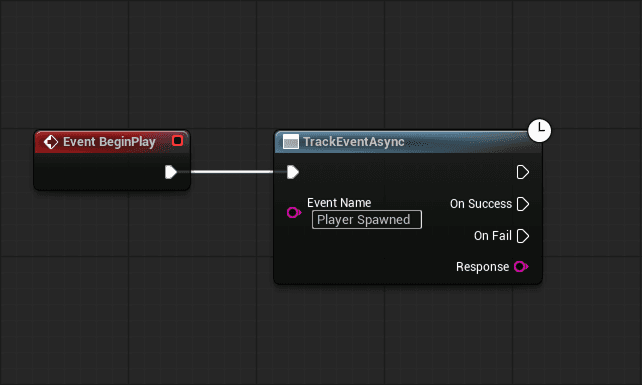
Inputs
| Pin | Description |
|---|---|
| Event Name | Name of the event you want to track. |
Outputs
| Pin | Description |
|---|---|
| On Success | Called when the event is successfully sent. |
| On Fail | Called if the request fails. |
| Response | Server response message. |
Example
Track a player jump.
Event Name

Player Jump

Properties

JumpType = Double Jump
Character = Warrior
Map = Castle
Use descriptive event names such as Level Started, Boss Defeated, or Item Purchased instead of generic names like Event1.
Start Replay Session
Starts recording a new Session Replay.
This node works even when Auto Replay is disabled in Project Settings.
Use it whenever you want complete control over when recording begins.
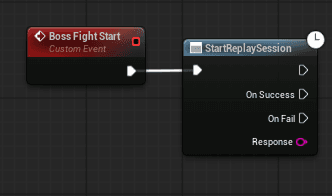
Inputs
This node has no required inputs.
Outputs
| Pin | Description |
|---|---|
| On Success | Replay started successfully. |
| On Fail | Replay could not be started. |
| Response | Server response message. |
Example
Record only a boss fight.
Player enters arena

↓

Start Replay Session

↓

Boss Fight

↓

End Replay Session
End Replay Session
Stops the current Session Replay and uploads the recorded data. Use this node together with Start Replay Session when recording gameplay manually.
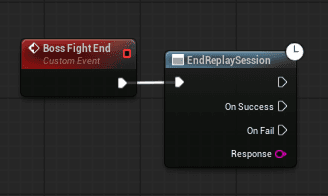
Outputs
| Pin | Description |
|---|---|
| On Success | Replay uploaded successfully. |
| On Fail | Replay upload failed. |
| Response | Server response message. |
Example
Start Replay Session

↓

Gameplay

↓

End Replay Session
Auto Replay vs Manual Replay
| Auto Replay | Manual Replay |
|---|---|
| Starts automatically | Started by Blueprint |
| Stops automatically | Stopped by Blueprint |
| Creates a replay for every level | Record only specific gameplay |
| Best for most games | Best for boss fights, tutorials and custom scenarios |
Best Practices
- Use Track Event for custom gameplay analytics.
- Use Auto Replay unless you need manual control.
- Use manual replay to record only important gameplay sequences.
- Always wait for On Success or On Fail before assuming a request completed.
Next
Want more control or prefer writing code?
➡️ C++ Usage